Basic Fundamentals of Digital Marketing for Learners | Dehradun School of Online Marketing
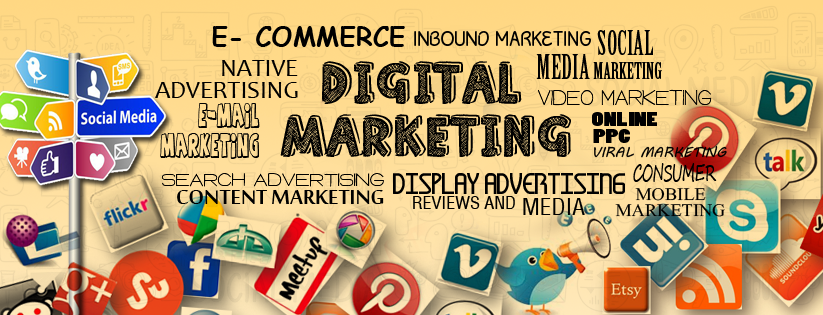
Today, there are lots of colleges and universities that are taking Digital Marketing seriously due to the demand of necessary knowledge to work in most of the industries. About a decade ago, Digital Marketing was not a major importance in the market, but now it is full-fledged field with bright career. There are lots of colleges and training institutes are available for knowledge distribution. If one needs to stand ahead of their competitors, then we need to prove themselves in any field. Nowadays, there are multiple ways to work in Digital Marketing. Digital Marketing has many elements and they can be broadly divided into four main categories. Digital Marketing Categories SEO: SEO stands for Search Engine Optimization, and it is the process of attracting visitors to website via Search Engine (like Google, Bing, Yahoo,..etc.) by increasing the ranking of the website. In an easy language “Search Engine Optimization (SEO) is the practice of increasing the quantity and quality of traffic to your website through Organic search engine results.” This method is unpaid or organic method of marketing where one doesn’t need to spend money. It is just based on the content and right keywords along with on-page optimization and off-page optimization, then the marketing can be done only on based of that. SMO: SMO stands for Social Media Optimization, and it is process of increasing the awareness of a product, brand or event by using a numbers of social media platforms. It is the way of attracting visitors to the website through the means of social media (like Facebook, Google+, Twitter,…etc). For example: if someone is having a Facebook Page, then they can get good number of traffic from the page using the popularity of the page. SMO is similar to SEO in that the goal is to drive traffic to your website. SMM: SMM stands for Social Media Marketing, and it is process of gaining traffic or attention through social media sites. It is paid marketing techniques on Social Media. For example: if someone is having a Facebook Page and wants to promote their products or business and services through the page which is having less popularity, then it is best way for them to use paid marketing techniques to increase awareness and sell their products or services. SEM: SEM stands for Search Engine Marketing, and it is the process of gaining website traffic by purchasing ads on search engines. It is the best way of increasing the visibility of the website by paid promotion methods. This Paid Marketing is done on Search Engine. For Example: AdWords from Google and Bing. It is very complex program tool from Google and Bing, but can help you to achieve great ROI if it done properly.
What is Digital Marketing? An introduction and its components
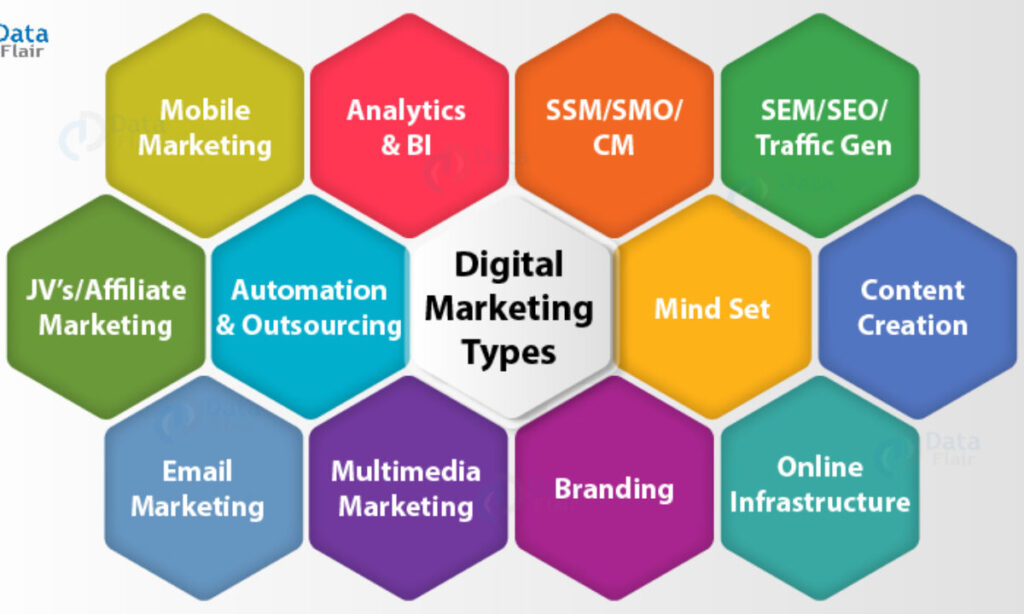
Digital Marketing Overview Introduction What is Digital Marketing? Why people are going online? Benefits of Digital Marketing What does Digital Marketing consists of? What is Digital Marketing? Digital Marketing is a term of two words: Digital and marketing, Digital is here with Internet and Marketing is related to advertising. Digital Marketing is a way in which companies or an Entrepreneur do marketing their products through electronic media, which is quite different from traditional way of marketing. “Digital Marketing is a process of building & maintaining customer relationship and the promotion of your business using online resources and tools. Tools used in digital marketing include websites, micro-sites, mobile apps and social media platforms to produce sales as well as catch customer that are searching on internet for response.” Why people are going online? For getting information on a product, service or location Socialize If they have a question If they are looking for help If they want more information on certain individuals or organizations For new jobs searching Do Business and many more Benefits of Digital Marketing Global reach Lower cost Put the consumer in control Provides convenience Increase satisfaction Trackable, measurable results Improve conversion rate Digital Marketing Objectives To achieve your business mission and goals on the web, you need specific digital marketing objectives that guide your online promotional activities. Digital marketing objectives should be SMART (Specific, Measurable, Achievable, Relevant and Time Related). Most Digital Marketing strategies and campaigns have following 5 objectives: Reaching the right audience To engage with your audience To motivate your audience Efficient spending on your campaign Return on investment (ROI) Improve Search engine rankings What does Digital Marketing consists of? Digital marketing consists of such as: Search Engine Optimization (SEO) Search Engine Marketing (SEM) Content Marketing Affiliate Marketing Web Design Pay-per-Click (PPC) Display advertising (Banner ads) Email marketing You will learn about all the above in the next article, stay tuned.
Search Engine Optimization (SEO) – Its Types and Techniques
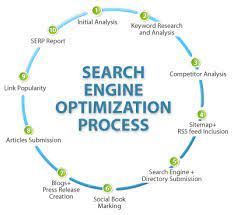
What is SERP? SERP is an abbreviation of Search Engine Results Page. Search engine results pages are those web pages displayed or serve to users when they search for something in search engines, such as Google, Bing, Yahoo after searching it produces some results and this is called a SERP. SEO stands for Search Engine Optimization. SEO is one of the most important parts of Digital Marketing. SEO is about getting organic traffic on website from search engines. In digital marketing, SEO is considered as one of the most effective channels for getting visibility, traffic on website without spending too much. SEO covers both the technical and creative elements required to improve rankings, drive traffic, and increase awareness in search engines including Google, Bing, Yahoo and other search engines. Things to know about SEO SEO is a long term strategy. SEO is part of inbound marketing and Search Engine Marketing. SEO gives you better ROI compared to other channels. Search Engine Optimization is difficult, complex and time consuming. But, delivers better results if implemented properly. Techniques used in Search Engine Optimization SEO is a technique of boosting your website’s rankings on search engines and is increasingly being used by most small and big businesses and platforms. This is a method through which a business or a website can gain more popularity and visibility among consumers and can hence boost its profits. SEO contains 3 techniques that are: White Hat SEO Black Hat SEO Grey Hat SEO White Hat SEO White hat SEO is one of the most popular SEO techniques and it utilizes techniques and methods to improve the search engine rankings of a website which do not run incorrectly of search engine guidelines. The white hat SEO techniques includes Proper use of title, keywords and meta tags, high quality content development, site performance, link acquisition campaigns which supported by high quality content. If we choose this type of SEO technique then we can expect a gradual, steady but lasting growth in ranking . Black Hat SEO Black Hat SEO is a type of SEO techniques that try to trick the search engine and manipulate the ranking of the site. This type of a method of SEO is not in accordance with the SEO guidelines set by the search engines and especially Google. The wholesome level of SEO technique is very low because of some technique of black hat SEO include keyword stuffing, doorway and cloaking, link spam, hidden link and hidden text. In this technique you can expect unpredictable, quick and short lasting growth in rankings. Grey Hat SEO Grey Hat SEO is not white and not black but gray, is midway between of both black and white SEO it’s basically all about balance between risk and reward. How Search Engine Works? The work of the search engine is divided into three stages, i.e. crawling, indexing and retrieval. Crawling The search engines have the web crawler or spiders to perform crawling. The task of crawler is to visit a web page, read it and follow the links to other web pages of the site. Each time the crawler visits a webpage it makes a copy of the page and adds its URL to the index. After adding the URL it regularly visits the sites like every month or two to look for updates or changes. Indexing In this stage, the crawler creates the index of the search engine. The index is like a huge book which contains a copy of each web page found by the crawler. If any webpage changes the crawler updates the book with new content. So, the index comprises URL of different WebPages visited by the crawler and contains the information collected by the crawler. This information is used by search www.dsom.in | This copy is under Copyright and not for sale to other people engines to provide the relevant answers to users for their queries. If a page is not added to the index it will not be available to the users. Retrieval This is the final stage in which the search engine provides the most useful and relevant answers in a particular order. Search engines use algorithms to improve the search results so that only genuine information could reach to the users, e.g. PageRank is a popular algorithm used by search engines. It shifts through the pages recorded in the index and shows those WebPages on the first page of results that it thinks are the best. Search Engine Optimization (SEO) can be split up into two separate categories: On-Page SEO Off-Page SEO. On-Page SEO– refers to all the things that you can do ON your website to help you rank higher, such as page titles, internal linking, Meta tags & descriptions, etc. Off-Page SEO –refers to all the things that you can do directly OFF your website to help you rank higher, such as social networking, article submission, forum & blog marketing, etc. On-Page SEO Overview On-Page Optimization involves all the activities related to optimization of the website which includes title tag, meta tags, URL structure of the page , internal linking within website, optimized image alt text, proper heading tags, quality content, link structure and much more. As On page optimization of the website will only be helpful if you avoid black hat techniques. Due to these activities instead of ranking on search engine, your website will be penalized or can be marked as spam. Benefits of On-page Optimization Higher Traffic Better ROI Increased site Usability Brand Awareness Cost Effectiveness On-Page Advanced SEO Tactics On-Page SEO and some of the most effective tactics to increase your page rankings on the search engines. Title Tag What is a title tag? A title tag is an HTML element that specifies the title of a web page. Title tags are displayed on search engine results pages (SERPs) as
Really Impressed with DSOM

DSOM is Digital Marketing Institute Bineet Pujara An interesting session with Bineet Pujara, DSOM’s Ex-trainee. Read on the complete interview to know how DSOM helped him to understand progress in the digital marketing world. Q1. Welcome, BINEET! Please introduce yourself to our readers? Ans. Hello, I am Bineet I lived in Dehradun and I have done MCA from IMS Dehradun. Now I join DSOM for digital marketing training. Q2. Please Tell Us, why you decided to go for Digital Marketing? Ans. Good career opportunity Because of the Digital revolution. Digital marketing is growing and wide filed and it is the best in the future. Q3. Why did you decide to join DSOM? Ans. Because they are best in his job the reputation of this institute and heard a lot of good things about this institute. Their focus is in practical knowledge more than theory. Q4. How was your experience with DSOM? Ans. My journey of DSOM going fabulous. DSOM mainly focus on the practical things. About the faculty of DSOM is so helpful and professional. The environment is very friendly. I gain lots of knowledge from there. Q5. Tell us the readers, How Digital Marketing helped in your Career? Ans. I am the IT student. Digital Marketing helped me a lot to improve my skill . it gives me numbers of way how to earn money online. Q6. How would you rate DSOM’s training program on a scale of 1-10? Ans.9/10 Q7. What would you say to Digital Marketing Aspirants? Ans. If you want to learn Digital Marketing, you must join DSOM they are the best in his job. They focus on practical.
Top 90+ high DA do follow free Image-photo sharing site list for SEO 2022
Top Free Image-photo sharing/submission sites 2018 with high DA and PA ranking to pump up your website on Google SERP Content: With the upcoming trend of marketing online it has become necessary for every business to reach on the first page of Google’s result page. To make your work easier we have listed top image submission sites of 2018 with high PA and DA ranking that will help you in reaching in the magic triangle of Google. How Image submission helps you in SEO? Image submission sites are a great way of creating resourceful backlinks for your website. These sites gives you a platform to share free images with a potential of global level exposure. Free Do follow Image sharing sites are an easy way to link your brand with the websites that have higher DA, PA and Alexa ranking. A user must also know that before uploading your photos, your images are of rich quality as your images are the speaker for your brand. Benefits of Image hosting submission site list: Increased Search Results Backlinks from authority Referral Traffic Targeted Audience Increased CTR (Clicked Through Rate) Global Exposure Quick Promotion
Robot.txt file, Inbound links and Outbound links with its types
What is Robots.txt file? Robots.txt is a text file that you put in the site’s root directory that specifies for search engines’ crawlers what website pages you want or don’t want to visit or crawl on your site. Robots main aim is read our website data and stored in search engine database. When search engine crawlers come to your site it will be looking for some special file. i.e., call roboat.txt file. This file tells to search engine spiders which pages of your site should be indexed and which pages of your site should be ignored. Structure of a Robots.txt File The structure of a robots.txt is pretty simple (and barely flexible) – it is an endless list of user agents and disallowed files and directories. Basically, the syntax is as follows: User-agent: Disallow: “User-agent” is search engines’ crawlers and disallow: lists the files and directories to be excluded from indexing. In addition to “user-agent:” and “disallow:” entries, you can include comment lines – just put the # sign at the beginning of the line: # All user agents are disallowed to see the /temp directory. User-agent: * Disallow: /temp/ How does it work? Before a search engine crawls your site, it will look at your robots.txt file as instructions on where they are allowed to crawl (visit) and index (save) on the search engine results. Robots.txt files are useful: If you want search engines to ignore any duplicate pages on your website. If you don’t want search engines to index your internal search results pages. If you don’t want search engines to index certain areas of your website or a whole website. If you don’t want search engines to index certain files on your website (images, PDFs, etc.) If you want to tell the search engines where your sitemap is located How to create a robots.txt file If you’ve not created a robots.txt file in your website or blog then you should make it as soon as possible. You must follow these instructions to create this: Create a new text file and save it as the robot.txt – you can use the Notepad program on Windows PCs or Text Edit if you use Macs and then “Save As” a text-delimited file. Upload it to your website’s root directory– this is generally a root level folder called “htdocs” or “www” which makes it appear directly after your domain name. If you use sub domains, you need to create different robots.txt file for each sub domain. Inbound Link What is an Inbound Link? An inbound link, known as a backlink, is a hyperlink coming from another website to your own website. The links to your site are very important for SEO. This is because search engines, such as Google, see multiple high-quality and relevant inbound links to a page or site as an indication that the content on that page is useful for its users. Why do I need Inbound Links? Reason #1: Search Engine Optimization (SEO) Websites that receive many inbound links can be more likely to rank higher in search engines. Basically, inbound links tell site crawlers that your website is an authority on a certain subject — so the more inbound links you have from high quality, high authority sites, the better your website can rank in search engine results pages (SERPs). Search engines don’t treat all inbound links the same and inbound links isn’t the only ranking factor they consider. Reason #2: Referral Traffic If someone posts an inbound link on their website or blog, people who see that link might click on it, and you’ll benefit from that referral traffic. The volume of traffic you get from referral traffic depends, of course, on how much traffic that blog or website receives in the first place. Outbound links What is an Outbound links? Outbound links, or External links – Those links which are going to direct to another specific webpage or website altogether from your website and you have more control over these links. It means if you click an outbound link it will take you to another specific webpage or website. It will send user to entirely different sites. Most, if not all, websites have outbound links. There are two kinds of outbound links: Nofollow link Dofollow link Dofollow Link Dofollow link is the normal link. It is the default link. You don’t have to add to the code, you don’t have to change anything. Just make a link and it’s automatically a dofollow link. A dofollow link is what every link should be like. It passes on Google PageRank juice from your webpage to the targeted webpage. An example of Dofollow Link: <a href=”https://www.google.com”>Google</a> Nofollow Link Nofollow link is the abnormal link. It does not pass on any Google PageRank juice to the targeted webpage but instead, it blocks off the Google PageRank flow. A nofollow link has a rel=”nofollow” tag inside the code. This tag says to the Google spider ‘not to follow’ the link. An example of Nofollow Link: <a href=”https://www.google.com” rel=”nofollow”>Google</a>
GOOGLE WEBMASTER with its BENEFITS | Dehradun School of Online Marketing
About Google Webmaster Google Webmaster Tools (GWT) is the primary mechanism for Google to communicate with its webmasters. It helps you to identify issues with your site and can even let you know if it has been infected with any threat of malware or anything. It’s absolutely free. GWT is a set of tools for webmasters. It is a very useful tool set that allows you to communicate with Google and adjust many aspects as of how Google sees your site, such as list the external and internal links to your site, adjust the crawl rate at which Google bot indexes your site, check the keywords users typed to land on your site, as well as to see your site’s statistics, and much more. If one uses Webmaster Tools along with Google Analytics, the results will turn out to be even better. You can also access your Webmaster Tools data directly from Google Analytics, so if you are already using Google Analytics, you could easily integrate it with Google Webmaster Tools, as well. Webmaster tool is very much helpful in the SEO process as well. The very 1st process in Search Engine Optimization is webmaster registration and website submission. After that, one has to prove the authorship of his or her website by doing the verification process. After verification, they can see all the website related data in the dashboard. One cannot start SEO without webmaster tool; it will help a lot. Benefits of Webmaster Tools- Google Webmaster Tool can help one a lot, some benefits of GWMT are- You can check crawl errors like if Google bots are getting some error while crawling your site like 404, Soft 404, DNS Error etc. One can also geographically target your website likewise if you want to target India; you can set India as your target and vice versa. You can demote site links which you don’t want. If you are having an ecommerce site & you don’t want some parameters to crawl, you can add that parameter. You can give access to users like your seo agency or employees. You can check how many pages been crawled by Google bot in a day via graph. You can block URLs which you don’t want Google to crawl. You can check any of your pages to check whether it is index able or not. You can check how many pages of your site been indexed. You can see if your site is affected by malware or something. You can see which queries people are searching on Google to visit your site. How many clicks that query is getting? What is the Avg. Position? What is the CTR you are getting? You can see how many outbound links you are getting. You can check your own internal links. The main benefit of GWMT is submitting sitemap of your site, so that Google bot can crawl your pages which he won’t. You can remove URLs which is indexed by mistake. If you are into ecommerce, you can check how many duplicate title tags, Meta descriptions, short title tags, missing title tags etc. are there. Again if you are into ecommerce, you can structure data in your page so that Google can detect & give specific results to users. You can link Google Merchant Centre, Analytics with your GWMT. You can check author stats on your blog post etc. There are other resources also which you can see to help you in using most of GWMT. Few of the Benefits are explained below: Helps one see their Website the Way Google Sees it If one is aiming for higher search engine rankings, then they need to be able to look at your website objectively or the way Google looks at it. GWT tools provide info on matter like search queries that has had helped other people find your website, traffic statistics, possible tweaks that could help betterment of your website ranking, number of links pointing to your website and those within your website, number of indexed URLs and much more. Think of it as a powerful tool for an SEO audit and one that helps prevent the common SEO mistakes that people routinely make, if you follow of its recommendations. Spots Errors that could Cost One their Rankings Many factors affect your website’s ability to get ranked on search engines. For example, Google also considers things like speed of page loading, error frequency and poor website wide linking. Thus, when Google’s query bots or crawlers visits your website, it logs crawl errors, site errors, crawl stats, and so on. All of these contribute to the factors as of how high your website will get ranked and vice versa. Using webmaster tools, one can easily detect pages with specific issues and make the necessary corrections immediately. Hacked websites or the websites infected with malware will also get a notification on their dashboard. Real Time Data on Your Sit Indexes and Crawls It’s much easier to spot real time changes on your website by just refreshing the dashboard when you’re logged into the webmaster. The tools will help you effect changes almost immediately and track/show their impact on your website in real time. For instance, if you changed your title tag from SEO to Devon SEO and want it to reflect almost immediately, you can submit the site using the ‘Submit to Index’ tool and see the changes go live in real time. It’s simply amazing to watch. Helps to spot Duplicate Content Issues Google is seriously cracking down duplicate content. In fact, sites with such duplicate content are typically avoided or de-ranked by Google itself. Using webmaster tool therefore can often help view links to content on your website that is not selected. If its number is low, then probably it is not a matter of concern. But if it’s on the increase, then it could be a pointer to the fact that you have duplicated content issue on your website. Tracks the Traffic performance and Ranking Metrics
(Important) What are Canonical Tags and How to apply a canonical tag?
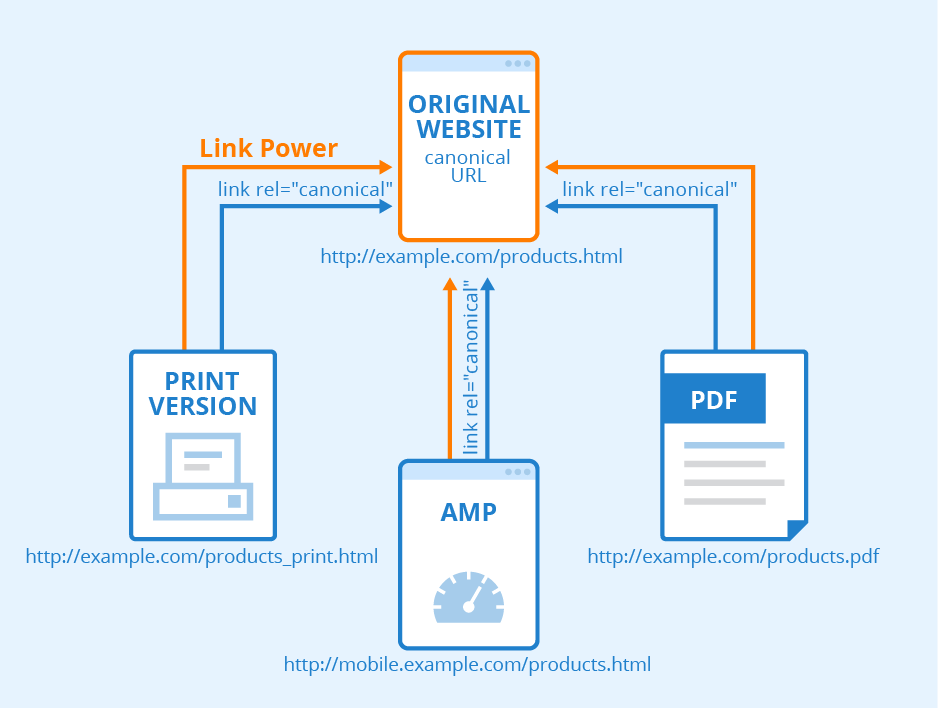
Canonical Tag is an HTML element that is used to prevent duplicate content issues. It specifies the canonical URL “the preferred version” of a web page and tells search engines that the other similar URLs are not different or duplicates; they are one and the same. See the following example of product page duplication of an e-commerce company; image In the image shown above, there are three product pages for the same product “yellow toy car”. These pages have the same content except the breadcrumb links. So, with the help of canonical tag we can mark one page as canonical version and eliminate two of the copies image In the above image, using canonical tag we have informed the search engine to consider the page located at (http://www.example.com/toys/cars/yellow) as original page and the other two URLs as variations of the original page. So, if your site displays the same content on multiple URLs, then by using canonical tag you can select the one URL as canonical version and can clear that other URLs are not duplicates. See one more example given below: http://www.example.com/ ( the main page) http:/example.com/ http://example.com/index.html Now, to show the main page as canonical version, we can place a canonical tag that references the main page (http://www.example.com) in the header of the other two URLs. See the related image shown below; image How to apply a canonical tag? You can apply this tag by adding a link tag to the head of the HTML code of the page that you want to be recognized as canonical by the search engine, e.g. to designate www.javatpint.com with the canonical tag, the code will look like as shown below; <link rel=”canonical”href=http://www.javapoint.com/seo-canonical-tag”/> How canonical tag helps improve SEO of a site It is very helpful in cases when you have multiple similar versions of a page or your content is accessible through multiple URLs. It enables you choose one version as canonical URL; you can create canonical URL for each set of similar URLs. After your canonical tag is ready, the search engine will consider all the links to similar versions as links to the canonical version that helps improve SEO of your site. Thank you for reading.
Broken Links and LSI (Latent Semantic Indexing), How to use and its benefits
Broken Links What is a Broken Link? A broken link or dead link is a link on a web page that no longer works because the website is encountering one or more of the reasons below. Reasons for broken links: An improper URL entered for the link by the website owner. The destination website removed the linked web page (causing what is known as a 404 error) The destination website permanently moved or no longer exists The user has software or is behind a firewall that blocks access to the destination website. The website owner linked to a site that is behind a firewall that does not allow outside access (such as an Intranet site or a restricted access area on a website). Broken links can be challenging for website visitors, making them unable to access the desired resource or information. These users may decide to make use of another site to find the necessary information elsewhere. A site that hasn’t been updated or checked for a long time may suffer from link rot, which is a term used to describe a site with dozens of broken links How to find Broken Links By the way, you will find many websites on the internet that can detect the broken link of your website but you can also find broken link from your website’s Google search console account (webmasters tools). Whenever you click on the Google search console, you will see an option on Crawl error that will help you find the broken link of your website. In this way, you can find the broken link of your website. How to remove Broken links To remove broken link, first of all you need to find the broken link which you can do in the way described above. Apart from this, here one more website is available in that you can easily find out the broken links and remove them. http://www.brokenlinkcheck.com/ This website will help you to search the broken link by submitting the URL of your website into it. Just a few minutes, you will find the whole broken link. LSI (Latent Semantic Indexing) What is LSI? LSI stands for latent semantic indexing. When you search for anything on Google; then it shows you some other results in drop down which are related to search query. Google wants to give you more relevant search. For example, if you type apple in search then, Google shows you apple iPhone brand related search but it also wants to confirm are you searching for fruit. If you are searching for fruit, then Google will show you search related to apple fruit. This is known as Latent Semantic Indexing of Google. “LSI keywords (Latent Semantic Indexing) are keywords semantically related to your main keyword. A lot of people think that LSI keywords are synonyms. But this is incorrect. LSI keywords are simply words that are frequently found together because they share the same context.” How to Use LSI Keywords? Add them all through the body of your article, as long as it sounds natural and appropriate. Here are the main places you should use your LSI keywords: Page title H1 and H2 tags URL address META tags Images alt text First paragraph of text Links anchor texts Last paragraph of text Benefits of LSI Keywords From the huge list of benefits here are some of my top picks: Safe from Spam-By using LSI Keywords in the article, you help Google understand that your article is not spam and that it’s natural. Also, it differentiates your content from spun content. Drop in Bounce Rate– By using LSI Keywords in the article, it helps to reduce Bounce rate and improve conversion rate. Improve Rankings Improve Blog Authority– More rankings will help you get more clicks, and as you start getting more clicks; your blog will build authority naturally. Use these tools to find LSI keywords: Google keyword planner LSI Graph Keyword Shitter Soovle SEMrush Mondovo KeywordTool.io
What is Digital Marketing and Benefits of Digital Marketing?
What is Digital Marketing? Digital Marketing is a term of two words: Digital and marketing, Digital is here with Internet and Marketing is related to advertising. Digital Marketing is a way in which companies or an Entrepreneur do marketing their products through electronic media, which is quite different from the traditional way of marketing. “Digital Marketing is a process of building & maintaining customer relationship and the promotion of your business using online resources and tools. Tools used in digital marketing include websites, micro-sites, mobile apps and social media platforms to produce sales as well as catch customer that are searching on the internet for a response.” Why people are going online? For getting information on a product, service or location Socialize If they have a question If they are looking for help If they want more information on certain individuals or organizations For new jobs searching Do Business and many more Benefits of Digital Marketing Global Reach Lower cost Put the consumer in control Provides convenience Increase satisfaction Trackable, measurable results Improve conversion rate Meta Desription : Digital Marketing is a term of two words: Digital and marketing, Digital is here with Internet and Marketing is related to advertising. Digital Marketing is a way in which companies or an Entrepreneur do marketing their products through electronic media Meta Keyword : What is digital marketing,benefits of digital marketing,digital marketing Category : Digital Marketing What are the Objective of Digital Marketing and Its Benefits? Digital Marketing Objectives To achieve your business mission and goals on the web, you need specific digital marketing objectives that guide your online promotional activities. Digital marketing objectives should be SMART (Specific, Measurable, Achievable, Relevant and Time-Related). Most Digital Marketing strategies and campaigns have the following 5 objectives: · Reaching the right audience · To engage with your audience · To motivate your audience · Efficient spending on your campaign · Return on investment (ROI) · Improve Search engine rankings What does Digital Marketing consist of? Digital marketing consists of such as: · Search Engine Optimization (SEO) · Search Engine Marketing (SEM) · Content Marketing · Affiliate Marketing · Web Design · Pay-per-Click (PPC) · Display advertising (Banner Ads) · Email marketing What is SERP? SERP is an abbreviation of Search Engine Results Page. Search engine results pages are those web pages displayed or serve to users when they search for something in search engine, such as Google, Bing, yahoo after searching it produces some results