The Impact of Google BERT Algorithm on Search Results

The way websites show up on search engines changes a lot, so it’s important to keep up with those changes if you want your website to be seen. Google BERT is a big improvement. Google’s BERT algorithm has changed how search results look for people. What is the Google Bert algorithm? BERT is a computer program made by Google that helps computers understand human language better. It came out in 2018 and now lots of people use it to do things like answering questions, figuring out how someone feels, and translating languages. BERT is a computer program that uses a special way of understanding sentences and documents called the Transformer architecture. BERT is a new way of processing text that looks at it from both directions, instead of just one like older models. It looks at the words before and after a word to understand what it means in that sentence. BERT can understand language better because it looks at how words in a sentence relate to each other in both directions. Google taught BERT by using a lot of text that’s available on the internet. By teaching the model with a lot of examples, BERT learns how to fill in missing words in a sentence (called “masked language modeling”) and figure out if two sentences come after each other in a text (called “next sentence prediction”). This training process helps BERT understand language better, so it can work better for lots of different language tasks. After some initial training, BERT can be further trained on specific language tasks using specific sets of data. When BERT is fine-tuned, it gets better at doing a specific job because it learns from examples. This makes it more accurate. BERT has made big progress in helping computers understand human language better, which is really important for NLP. This algorithm is really good at understanding the meaning behind words and sentences, even when they’re complicated. That’s why it’s so important in the field of natural language processing. How does Google BERT impact search results? Google now understands what users are searching for in a better way because of BERT. Google BERT makes search results more accurate by looking at the whole search phrase, including small words like “and” and “in.” This makes sure that users get better and more correct answers to their questions, which makes searching easier. Enhancing SEO with the Google BERT algorithm: Consider the following tactics to optimize your SEO efforts and take advantage of the BERT algorithm’s power: Optimize content for user intent: Content should be optimized for user intent by understanding the motivation and intent behind relevant search terms. Create material that successfully meets these objectives. Focus on supplying useful information and succinct, clear answers to customer questions. Focus on long-tail keywords: Emphasizing long-tail keywords will help BERT better understand the context of lengthier, more precise search queries. Use pertinent long-tail keywords to make it more visible to readers looking for more accurate information. Write high-quality content: It is producing specific, high-quality content, while BERT Google-optimizing your website is crucial. Attempt to offer in-depth details that address a topic’s a variety of angles. This improves BERT’s comprehension of your material and draws in users looking for in-depth knowledge. Improve readability and user experience: Increasing readability and user experience is vital since, according to BERT, it affects search rankings. Ensure your material is available on various platforms, visually appealing, and easily read. Use bullet points, headings, subheadings, and other formatting tools to improve readability and make the text easier to scan.
The 10 best Digital Marketing Blogs to read in 2023
Data:. Stay up-to-date with the latest digital marketing trends and strategies by following the 10 best digital marketing blogs in 2023. From SEO to social media, these blogs offer valuable insights, tips, and resources to help you improve your digital marketing skills and achieve success online. Here are the 10 best Digital Marketing blogs site. Moz Neil Patel Hubspot Social Media Examiner Content Marketing Research Semrush Search Engine Journal Word Stream MarketingProfs LLC Social Media Today Let’s discuss each one by one. 1.Moz: Moz Blog is a popular digital marketing blog run by the SEO software company, Moz. The blog covers a wide range of topics related to digital marketing, with a focus on search engine optimization (SEO) and content marketing. Moz is well-known for its SEO software tools, and the company’s expertise in this area is reflected in the content of its blog. Moz Blog offers valuable insights and advice on all aspects of SEO, including keyword research, on-page optimization, link building, technical SEO, and more. The blog also covers otter related topics, such as content marketing, social media, and local SEO. Title: How we became Digital Marketers in just one summer. 2.Neil Patel: Neil Patel is a well-known digital marketing expert, entrepreneur, and author. He is the founder of several successful companies, including Crazy Egg, Kissmetrics, and Neil Patel Digital. Neil Patel’s blog is a popular digital marketing resource that offers valuable insights and advice on various aspects of digital marketing, including SEO, content marketing, social media, and email marketing. Neil Patel’s blog is known for its comprehensive, in-depth articles that cover a wide range of digital marketing topics. The blog provides practical tips and advice on how to improve your digital marketing strategies, and the articles are well-researched and written in a clear, easy-to-understand style. Title: The Future of Content Marketing: Strategies for 2023 and Beyond 3.HubSpot: HubSpot is a well-known name in the marketing and sales industry, providing software and tools to businesses to help them grow and succeed. In addition to its software offerings, HubSpot also has a comprehensive blog that covers a wide range of topics related to marketing, sales, customer service, and more. The HubSpot blog is a treasure trove of valuable information for anyone involved in marketing or sales, with articles covering everything from social media marketing to email marketing to lead generation and beyond. The blog is updated frequently, with new articles published several times a week, so readers can always find fresh content to keep them informed and inspired. One of the great things about the HubSpot blog is the depth and breadth of its content. The blog covers a wide range of topics and is written for marketers and sales professionals of all levels of experience, from beginners to seasoned experts. This makes it a great resource for anyone looking to improve their marketing or sales skills and knowledge. Title: The Who, What, Why, & How of Digital Marketing 4.Social Media Examiner: Social Media Examiner is a leading online resource for social media marketing education and news. The website offers a wide range of resources, including articles, podcasts, webinars, and more, to help businesses and marketers stay up-to-date on the latest trends and best practices in social media marketing The Social Media Examiner blog is one of the most popular features of the website, providing a wealth of valuable information for marketers looking to improve their social media strategies. The blog covers a wide range of topics, from Facebook marketing to Instagram advertising to social media analytics and beyond. One of the great things about the Social Media Examiner blog is the quality of its content. The blog’s authors are experts in their fields and provide in-depth analysis and insights on the latest trends and developments in social media marketing. The blog is also written in a clear and concise manner, making even complex topics easy to understand. Title: 10 Successful Facebook Marketing Examples 5.Content Marketing Research: Content Marketing Institute (CMI) is a leading online resource for education and training on all aspects of content marketing. The website offers a range of resources, including articles, research reports, e-books, and more, to help businesses and marketers stay up-to-date on the latest trends and best practices in content marketing. The CMI blog is one of the most popular features of the website, providing a wealth of valuable information for marketers looking to improve their content marketing strategies. The blog covers a wide range of topics, from content strategy to content creation to content distribution and beyond. One of the great things about the CMI blog is the quality of its content. The blog’s authors are experts in their fields and provide in-depth analysis and insights on the latest trends and developments in content marketing. The blog is also written in a clear and concise manner, making even complex topics easy to understand. Title: 7 Things B2B Content Marketers Need in 2023 6.Semrush: SEMrush is a leading provider of SEO and digital marketing tools, and their blog is one of the most popular resources on their website. The SEMrush blog provides a wealth of information for marketers looking to improve their SEO strategies, as well as their PPC and social media marketing efforts. One of the great things about the SEMrush blog is the variety of topics covered. The blog covers a wide range of topics, including SEO, PPC, social media marketing, content marketing, and more. This makes it a valuable resource for marketers looking to improve their overall digital marketing strategy. The blog’s authors are experts in their fields and provide in-depth analysis and insights on the latest trends and developments in digital marketing. They offer practical advice that businesses and marketers can use to improve their strategies and achieve better results. The blog also features case studies and examples of successful marketing campaigns, providing readers with real-world examples to learn from. Title: The Benefits of Google Analytics The Benefits of Google Analytics and Google AdWords Certification
Top 10 Tips to Create a Graphic Design Portfolio
As a graphic designer it is important to have portfolio, because it is an essential tool for any every graphic designer which help to showcase their work skills and attract potential clients. It is a collection of your best work that demonstrates your skills, creativity, and style. Creating a portfolio can be a daunting task, but with the right tips, you can create a portfolio that stands out and impresses potential clients. Here are some tips on how to create a graphic design portfolio. Determine Your Purpose Before creating your portfolio is it necessary to determine that what is the purpose of creating portfolio? What do you want to achieve with your graphic designing portfolio? Do you want to attract new clients, showcase your skills to potential employers, or simply display your work to the world? Your purpose will determine the content, style, and format of your portfolio. Choose Your Best Work Your portfolio is a reflection of your skills and creativity, so it’s very important to choose your best work. Select that pieces of works that showcase your range of skills, your style, and your ability to solve design problems. Be selective and choose pieces that demonstrate your ability to work on a variety of projects, from branding to web design. Create a Consistent Style Creating a consistent style throughout your portfolio is important. It helps to showcase your personal brand and creates a cohesive look that is easy to navigate. Use a consistent color palette, typography, and layout throughout your portfolio to create a professional and polished look. Include Process Work Including your process work is a great way to showcase your design thinking and problem-solving skills. This can include sketches, wireframes, and mockups. It’s important to show your process, as it demonstrates your ability to think critically and creatively. Use High-Quality Images Using high-quality images is essential when creating a portfolio. Poor-quality images can detract from your work and make it look unprofessional. Always use high-resolution images that are clear and easy to see in your portfolio. If possible, include images of your work in action, such as a website or brochure. Show Your Range of Skills Your portfolio should showcase your range of skills, from branding to web design. Including a different types of projects in your portfolio show your versatility and ability to work on variety of projects. This can help to attract a wider range of clients and employers. Keep it Simple Keep your portfolio simple and easy to navigate. Use a clean and simple layout that highlights your work and makes it easy for potential clients to find what they are looking for. Don’t make it too messy. Include Your Contact Information Including your contact information is essential when creating a portfolio. Make it easy for potential clients to contact you by including your email address, phone number, and social media handles. This can help to attract new clients and make it easy for them to get in touch with you. Get Feedback Getting feedback on your portfolio is important. Ask friends, family, and colleagues to review your portfolio and provide feedback. This can help you to identify areas for improvement and make changes that will make your portfolio stand out. Keep it Up to Date At last but not the least, it’s important to keep your graphic designing portfolio up to date. Add new projects as you complete them and remove older projects that no longer represent your best work. Keeping your portfolio up to date demonstrates your commitment to your work and your willingness to grow and improve. In conclusion, creating a graphic design portfolio is an essential step for any designer looking to showcase their work and attract potential clients. By following these tips, you can create a portfolio that stands out and impresses potential clients. Remember to keep it simple, consistent, and up to date, and you’ll be well on your way to creating a portfolio that showcases your skills and creativity.
Interview Tips

Interview Tips The job interview is a crucial step in the hiring process and plays a significant role in determining whether you secure the position you desire. To increase your chances of success, it’s important to prepare thoroughly and present yourself in the best possible way. In this article, we’ll provide you with valuable interview tips. 1. Introduction Job interviews are an opportunity for employers to assess your suitability for a position and for you to showcase your skills and experience. They serve as a platform for employers to learn more about you and for you to learn more about the company and the role you are applying for. 2.Preparing for an Interview Before the interview, it’s essential to gather information about the company. Research its history, products or services, company culture, and recent news or achievements. This knowledge will enable you to ask insightful questions and demonstrate your interest in the organization. Additionally, review the job description carefully and make a list of the skills and qualifications required for the role. This will help you tailor your answers to match the job requirements. To further prepare, practice common interview questions and formulate concise and compelling responses. Anticipate questions about your strengths, weaknesses, and previous experiences. By practicing, you’ll gain confidence and be able to deliver your answers more effectively during the actual interview. 3. Dressing for Success First impressions matter, and your attire plays a significant role in creating a positive impression during an interview. Dress professionally, adhering to the company’s dress code or opting for business formal attire if unsure. Ensure your clothes are clean, wrinkle-free, and well-fitted. Pay attention to grooming as well, ensuring your hair is neat, nails are trimmed, and accessories are minimal. 4. Non-Verbal Communication Non-verbal communication speaks volumes during an interview. Maintaining good posture portrays confidence and attentiveness. Sit up straight, avoid slouching, and lean slightly forward to show interest. Use appropriate hand gestures to emphasize your points but avoid excessive movement, which can be distracting. Most importantly, maintain eye contact with the interviewer, signaling that you are engaged and actively listening. 5. Review Your Resume and Cover Letter Your resume and cover letter are the first things the hiring manager will see. Therefore, it is important to review them carefully before the interview. Make sure that your resume and cover letter accurately reflect your skills and experience, and that there are no typos or grammatical errors. 6. Arrive Early Arriving early to a job interview is a sign of respect and shows that you are organized and reliable. Make sure to leave plenty of time to get to the interview location, and plan to arrive at least 15 minutes early. 7. Be Confident and Enthusiastic During the job interview, it’s important to be confident and enthusiastic. Make eye contact with the interviewer, smile, and speak clearly. Show that you are excited about the job opportunity and that you are the best candidate for the position.
TYPES OF GRAPHIC DESIGN
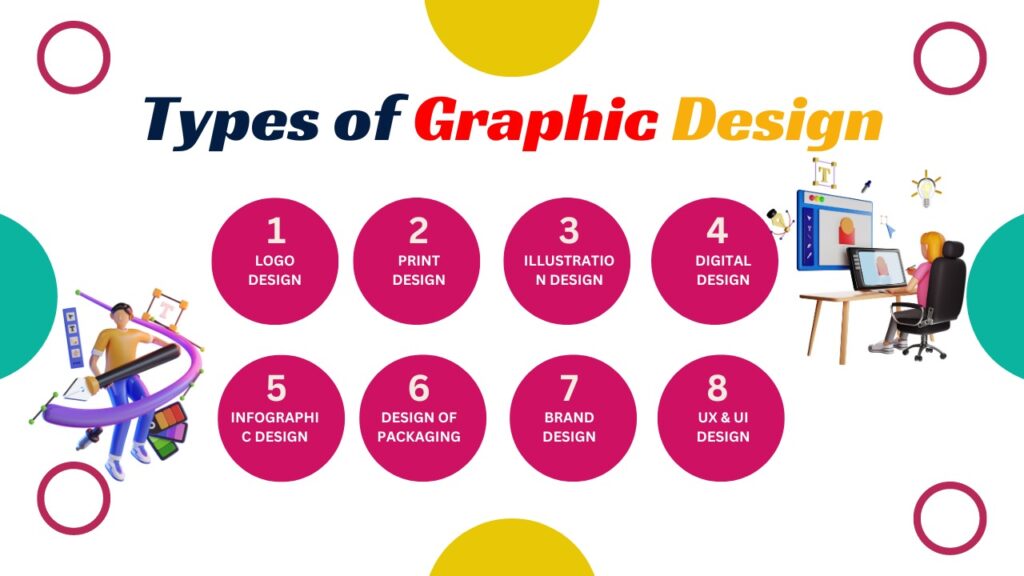
Graphic design is an effective mode of communication that has evolved over time. There are several sorts of graphic design that you can utilise to create something eye-catching for an advertisement or a publication. These are the basic types of graphic design that may help make any notion stand out, from logo design to infographic design. 1.LOGO DESIGN The process of producing a picture that represents an entity, such as a corporation or an organisation, is known as logo design. It is the most crucial graphic design element and one of any brand’s most recognisable faces. A great logo should be simple to recognise and remember, and it should convey the values and messages of the organisation it represents. 2.PRINT DESIGN Print design is a type of graphic design that showcases a brand or message through printed materials such as posters, brochures, magazines, newspapers, book covers, and others. A successful print design must successfully deliver the message in the most precise and appealing manner possible. Print design, as opposed to web design, is more physical and allows the designer to experiment with materials such as paper, ink, and fonts. 3.ILLUSTRATION DESIGN The art of designing digital or hand-drawn images for business purposes is known as illustration design. Illustrations can be utilized in journalistic projects, logos, ads, packaging, games, and on websites, among other things. Illustrations frequently make a concept more “real” for onlookers, giving the design something unique. 4.DIGITAL DESIGN The goal of digital design is to create user experiences and interfaces. This Type of graphic design necessitates familiarity with a variety of approaches and technologies, such as Photoshop, Sketch, and Adobe XD. Interface design, web design, motion design, and other features are all part of digital design. 5.INFOGRAPHIC DESIGN The technique of producing aesthetically appealing and understandable data visualisations is known as infographic design. Infographics are frequently used to simplify complicated subjects that might otherwise be confusing or difficult to understand. In order to be aesthetically appealing and get attention, an infographic needs to be well thought out, organised, and produced. 6.DESIGN OF PACKAGING Package design is a type of graphic design that is used to produce product packaging. It comprises shaping, sizing, labelling, and other details. A good package design should be eye-catching, imaginative, and attractive in communicating the message and purpose of the product. Product packaging should also represent the company’s branding and be simple to read and understand. 7.BRAND DESIGN Brand identity design is a component of branding and a type of visual communication. It encompasses the brand’s logo, icon, typeface, colours, and general appearance. The design of a brand’s identity should reflect the company’s essential message, beliefs, and personality. 8.UX & UI DESIGN UX & UI design is the Type of Graphic & process of creating graphical user interfaces, such as websites, apps, and software, that are accessible, easy to use, visually appealing and user-cantered. UX design focuses on user experience, while UI design focuses on aesthetics, such as color and layout to create a user’s desired user journey. Together, these two components create the complete interface of products and websites, helping users achieve their goals. These are the main types of graphic design used in today’s world. Whether you’re looking to create something for a digital or print format, there is a type of graphic design for you. Make sure to take the time to understand each technique to maximize the potential of your designs. No matter what type of graphic design you use, it is important to keep in mind that it should be creative, eye-catching, and meaningful. With the right graphic design, you can turn your ideas and messages into a visual medium that can get the attention it deserves.
Top Reasons to Choose a Website Designing Course
Are you looking for a career change or a way to boost your existing skill set? Then look no further – enroll in a website designing course now! In today’s digital age, where having a strong online presence is crucial for businesses of all types. Websites play a significant role in creating an impactful online identity. As a result, the demand for skilled web designers is on the rise. Now let’s talk about some of the top reasons why you should consider taking a website designing course: In-Demand Skill Set: The demand for skilled web designers is consistently high. Every industry, be it e-commerce, education, healthcare, or entertainment, requires well-designed websites to engage their target audiences. By gaining expertise in website design, you gain a valuable and in-demand skill set that sets you apart from the competition in the job market. Lucrative Career Opportunities: The digital landscape is rapidly evolving, and businesses are increasingly relying on websites to attract and retain customers. By gaining skills and knowledge through a website designing course, the doors to a wealth of lucrative career opportunities are open to you. From working as a freelance web designer, to working for established design agencies, to starting your own web design company, the possibilities are many. 3. Creative Development: Website design is an art form where you can let your creativity run wild. Under website designing course, you’ll learn about the basic principles of design, color theory, typography, and layout techniques. Also you’ll have the opportunity to express your artistic vision by creating visually appealing and user-friendly websites. It’s a perfect blend of creativity and technology that makes it an exciting field to explore. 4. Continuous learning and growth: The field of website designing is constantly evolving. Technological advances, new design trends, and new user preferences are shaping the industry. By taking a website design course, you ensure you stay current with the latest tools, techniques, and best practices. 5.Versatile and Transferable Skills: The skills you gain in website design are highly versatile and transferable. While the course focuses primarily on website design, you’ll also gain skills in areas such as user experience (UX), graphic design, programming languages (HTML, CSS, etc.), and content management systems (CMS). These skills can be applied not only to website design, but also to other digital projects, such as mobile app development or digital marketing campaigns. 6. Flexibility and work-life balance: Web design offers a high degree of flexibility in terms of work arrangements. Many web designers work as freelancers or remotely, which gives them the freedom to choose their projects and work hours. This flexibility allows for a better work-life balance, so you can pursue other interests or spend time with family while building a successful career in website designing. If you’re considering a career in website designing or simply want to improve your existing skills, taking a website designing course can be a wise decision. From gaining a competitive edge in the job market to developing your creative skills, a website design course will equip you with the right knowledge and skills to pursue a career in the field of web design. A course in website designing will provide you with the necessary skills and knowledge to excel in this rapidly growing field. It opens up numerous career opportunities, allows you to express your creativity, and equips you with in-demand skills. To summarize, we can say that, with a website designing course, you can open up a whole new world of possibilities! Not only can you create stunning designs, but it can also lead to new job opportunities and a greater understanding of the digital world as it provides you with a versatile skill set, allowing you to express yourself creatively, and helps you to adapt to the changing digital scene.
The evolution of graphic design: Trends and predictions for the future
History and Evolution of graphic design The evolution of graphic design is a fascinating story since its inception. Started with the earliest cave drawings and has progressed into the digital age of today. The history of graphic design can be traced back to prehistoric times when early humans used symbols and images to convey messages and tell stories. Cave paintings from over 30,000 years ago were some of the earliest examples of graphic design, used to communicate hunting rituals, everyday life, and spiritual beliefs. As humans developed new tools and materials, graphic design continued to evolve, with the invention of writing systems, typography, and printing techniques. It is a fascinating story of creative innovation, technological advances, and cultural changes that have influenced the way we communicate and express ourselves visually. One of the most significant periods in the evolution of graphic design was the Industrial Revolution of the 19th century. The mass production of goods and the rise of consumerism led to a need for effective advertising and branding. The early 20th century was a time of experimentation and innovation in graphic design. The rise of modernism in art and architecture influenced designers to create simple, functional designs that emphasized form over ornamentation. The Bauhaus school in Germany, founded in 1919 by Walter Gropius, was one of the most influential design schools of this period, with a focus on the principles of simplicity, functionality, and mass production. The mid-20th century saw the rise of postmodernism, a reaction to the perceived limitations of modernism. Postmodernism embraced a more playful, eclectic style, with designers drawing on a wide range of influences, including pop culture, historical styles, and non-Western design traditions. The graphic design of this period was characterized by bold typography, bright colors, and a sense of humor. With the advent of digital technology in the late 20th century, the graphic design underwent a radical transformation. The rise of personal computers, desktop publishing software, and the internet gave designers unprecedented control over their work and allowed for greater experimentation and collaboration. The development of software such as Adobe Photoshop and Illustrator enabled designers to create complex, layered designs with ease. Today, graphic design continues to evolve and adapt to new technologies and cultural shifts. The rise of social media and mobile devices has led to new challenges and opportunities for designers, as they work to create designs that are responsive, engaging, and accessible. From the earliest cave paintings to the digital designs of today, the evolution of graphic design is a testament to the power of human creativity and innovation. Remote work is the new way The evolution of graphic design has been closely linked to advancements in technology and the changing needs of businesses and consumers. In the past, graphic designers were primarily focused on creating print materials, such as brochures, posters, and packaging. However, with the rise of the internet and digital media, graphic designers had to adapt their skills to create digital designs for websites, mobile apps, and social media platforms. Today, many industries are transitioning into remote work, and the graphic design industry is no exception. With the advancement of technology, designers can now work from anywhere in the world as long as they have a laptop, a reliable internet connection, and the necessary software. This trend has opened up opportunities for designers to collaborate with clients from different parts of the world and work on a variety of projects. In 2023, we can expect more graphic design agencies and freelancers to start working remotely, and companies to hire designers from different parts of the world to work on their projects. This trend aims to stimulate creativity and diversity as designers from different cultures and backgrounds collaborate and bring new perspectives. As a result, the evolution of graphic design will continue to adapt to the changing needs of businesses and consumers, and the advancement of technology will continue to play a critical role in this evolution. AR and VR revolution As the evolution of graphic design continues, technology is becoming an increasingly important aspect of the field. One trend that is set to shape the future of graphic design is the use of virtual and augmented reality. With the growing popularity of these technologies, designers are now exploring how they can incorporate them into their work. virtual and augmented reality offer an immersive experience that stimulates all the sensory mechanisms in the body, providing an experience that goes beyond reality. In 2023, we can expect to see more graphic designers incorporating virtual and augmented reality elements into their designs to create more immersive experiences for their audiences. Who doesn’t know about AI, and what they can do especially in 2023, where you saw a small fraction of their ability like Chat gpt, Mid journey, etc.? And in real-time AI tools are more accessible, and designers can now automate certain tasks, such as resizing images and generating color schemes. This trend will free up designers’ time, allowing them to focus on more creative tasks that require human input. Font Trends The evolution of graphic design has brought about a significant change in the use of font trends. Graphic designers used to rely on the same old font trends since its inception, but with the changing times, users now demand more creative and unique typography. In recent years, there has been a surge in the use of creative font trends such as 3D typefaces, logos, and other designs. This trend is expected to continue in 2023, with designers exploring unconventional, playful, and eye-catching typefaces. With the advancements in technology, designers can easily create stunning 3D lettering that adds depth and dimension to their designs. This trend is particularly popular in advertising, where 3D typography can be used to create attention-grabbing visuals that capture the viewer’s attention. In summary, the evolution of graphic design has led to a significant shift in typography, with designers exploring new and creative ways to enhance their designs. The use of 3D typography is expected to continue to be a
4 Key Content Marketing Trends for 2023
Content Marketing 2023 In the realm of online marketing, there is a persistent truth the most important factor is the content: in the world of digital marketing, one thing remains constant: content is Key. Regardless of the year or the latest trends, creating compelling content remains an effective tool to attract and persuade customers. Effective content marketing can be a cost-effective or even free way to reach your target audience with the information they need to make informed decisions. Looking ahead to 2023, the content marketing landscape continues to evolve at a rapid and exciting pace. Building on the trends of 2023, this year’s focus is on using artificial intelligence to increase productivity and overcome writer’s block. With so much content to create and so little time to do it, marketers are turning to cutting-edge AI tools to help them produce high-quality copy in record time. But it’s not just about the latest technology. Successful content marketing in 2023 requires a deep understanding of your target audience and a keen eye for emerging trends. Whether it’s long or short content, TikTok or Twitter, the most effective marketers are those who can develop a coherent strategy that leverages the best of both worlds.So if you want to stay ahead of the curve and make a splash in the world of content marketing, now is the time to embrace the latest tools, techniques, and strategies. Outlines of the Content Short Form Videos Content AR and VR trends Podcast Unprecedented Revolution Long content dominance 1.Short Form Videos Content Short videos have become a popular trend in content marketing in recent years. With the advent of platforms like TikTok, Instagram Reels, and YouTube Shorts, marketers have leveraged these platforms to reach their target audiences with short, engaging, and memorable videos. Looking ahead to 2023, the short video trend will only continue to grow and evolve. The main reason short videos have become so popular is their ability to grab attention quickly. In today’s fast-paced world, people have less time, and they want content that gets a message across quickly and efficiently. Short videos can do just that, and they also have the added benefit of being easily shared and consumed on mobile devices. Also, short videos are so successful that they give brands the opportunity to showcase their personality and creativity in a unique way. In just a few seconds, a brand can make an impression on viewers and leave a lasting impression. Short videos also allow for experimentation and testing of new ideas without having to invest too much time or money in a longer video. It has endless possibilities. 2.AR and VR trends Augmented reality (AR) and virtual reality (VR) have been around for some time, but they have become increasingly popular in recent years. These technologies offer a new way to connect with consumers and create engaging experiences that can help brands stand out in a crowded marketplace. AR and VR are already changing the way we absorb content. From gaming and entertainment to education and training, these technologies are providing a new level of involvement that was not possible before. In 2023, we definitely going to see even more brands using AR and VR to create engaging content that appeals to their target audiences. The most affected area where we can expect to see a lot of growth is in the use of AR and VR for product demonstrations. Just Imagine for a second that you are able to see a 3D model of a product right in front of you or virtually try on clothing before making a purchase. This type of close experience is already being used by some brands, but we can expect it to be much more widespread in 2023. Another area where AR and VR can be used for content marketing is to create interactive experiences. For example, a brand could create an AR scavenger hunt that takes consumers on a tour of a city or museum. Or it could create a VR experience that allows consumers to explore a product in detail, such as a car or a new tech gadget. One of the biggest advantages of AR and VR is their ability to create an emotional connection with the consumer. By immersing consumers in a brand’s story or message, AR and VR can create a much deeper connection than traditional forms of advertising. We can expect to see more brands using these technologies to make emotional connections with their target audience in 2023. Finally, we can expect to see more use of AR and VR in social media marketing. Platforms like Snapchat and Instagram already use AR filters to engage users, and we can expect this to become more common in the future. Brands can use these filters to create fun and interactive experiences that users will want to share with their friends and followers, creating a viral influence that can increase brand awareness and engagement. 3.Podcast Unprecedented Revolution These past few years, podcasts have become a dominant force in content marketing. With their ability to engage listeners on the go and offer unique perspectives on a wide range of topics, podcasts have become a popular medium for consumers and marketers alike. The future of content marketing is increasingly linked to the growth of podcasts, and there are several key aspects that will shape this trend for the industry in 2023. One of the key reasons podcasts are belittling others’ content marketing is their ability to deliver genuine and engaging content. Unlike traditional advertising, podcasts are a form of content marketing that is able to build trust and relationships with listeners over time. This is because podcasts allow for more in-depth conversations and discussions that can help create a deeper connection between podcast host and their audience. As a result, podcasts have become a powerful tool for building brand loyalty and driving customer engagement. The reason podcasts are the future of content marketing is their ability to reach highly targeted audiences, by focusing on specific topics or niches, podcasts can attract a
Tips and Tricks for Responsive Web Designing
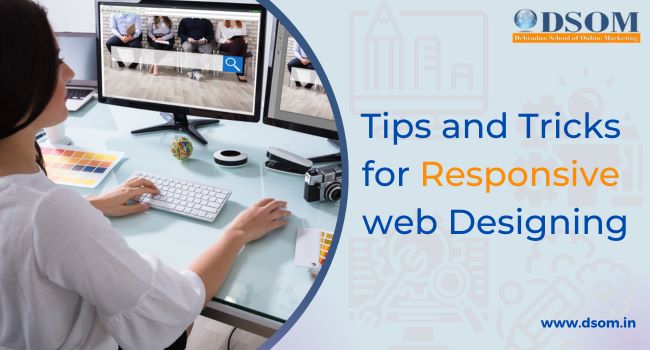
Responsive Web design Before diving into tips and tricks to create responsive web design first we must know the meaning behind Responsive web design. The method or strategy by which we design a website that works perfectly on multiple devices is known as responsive web design, for ex- different screen sizes, resolutions, etc. In today’s world, where everything is accessible in just a small mobile device, where you can connect to anyone around the world through the internet. And with the responsive design website, they can easily navigate and make the user experience better. It provides many options to the user regardless of the device they are using for example if a user has some visual defect the website will provide zoom-in or zoom-out and scrolling options, images, menus, etc. There are so many things to know before creating responsive web design. So, without wasting time let’s jump into some important tips and tricks that you should use to design your website to make it responsive and increase user engagement. Tips and tricks for responsive web design 1. Fluid grid system A fluid grid system is one of the most important parts to develop a responsive web design because it performs perfectly on a variety of devices with different screen sizes and resolutions. The fluid grid system is based on relative values, such as percentages, rather than fixed values, such as pixels or inches. This means that the layout of the page can be dynamically adjusted and scaled depending on the size of the viewport or the device it is being viewed on. 2. Image optimization Nowadays image is coming in very big sizes and loading those images consume so much time, and memory so it’s important that images are optimized for the web so that they load quickly and don’t slow down the page. Optimized images have a smaller file size, which means they load faster than larger, uncompressed images. This can have a significant impact on overall page load time, especially for mobile users who may be using slower connections. It also helps search engine optimization (SEO). Search engines like Google take page load time into account when ranking websites in search results. If your website contains slow-loading images, it can affect search results, which can negatively impact traffic and engagement. Image optimization can also help reduce bandwidth usage and server load, which can save you money on hosting costs. By optimizing your images, you can reduce the amount of data that needs to be sent to users, which can help lower hosting costs. So, you need to consider file size and image quality. While smaller file sizes are important to speed up page load times, you don’t want to sacrifice image quality in the process. Finding the right balance between file size and image quality is key to successful image optimization. 3. Responsive Flexible typography Responsive typography is a key aspect of responsive web design, allowing your website content to adapt to different screen sizes and devices without compromising readability or looks. With flexible typography, designers can create a smooth and seamless user experience that improves readability, accessibility, and usability. Flexible typography will automatically adjust the font size, line spacing, and line spacing to fit the screen size of the device you’re using to view your website. This means that the text remains legible and easy to read regardless of whether the user is viewing the page on a desktop or a mobile device. In addition, flexible typography allows designers to use a wider range of font sizes and styles without sacrificing consistency and uniformity. And it is because it runs on relative units like em and rem rather than fixed units like pixels, which can be problematic when scaling across multiple devices. Another important aspect of flexible typography is the use of variable typefaces, which allow designers to create more complex and dynamic typefaces with different weights, styles, and widths. Variable fonts provide greater control over the appearance of text and allow designers to adjust the weight and style of text to suit the context of the content. This is all you have to keep in mind. 4. CSS media queries The most important tool of responsive web designing. This will allow designers to create a unique design that can place different screen sizes, resolutions, and orientations on different devices such as desktops, laptops, tablets, and smartphones. Media queries are used to apply specific styles to a webpage depending on the size and capabilities of the device used to view it. In this way, they allow designers to optimize the layout and presentation of website content for different screen sizes and devices, thereby improving the visitor’s user experience. Without media queries, a website would not be able to adapt its layout and content to different screens on different devices. This can result in a poor user experience as visitors may have difficulty reading content or navigating the site, which can lead to high bounce rates, lower engagement, and a negative impact on site conversion rates. It also helps in rendering web pages mainly based on other device properties such as device orientation, resolution, or color depth. For example, a media query can be used to apply different styles to a web page that is displayed in portrait or landscape orientation to ensure the content is always optimized for the best viewing experience. 5. Responsive Navigation Navigation is essential in responsive web design as it helps users find the information they need quickly and efficiently no matter what device they are using. Some tips: Keep it simple: One of the most important things to consider when designing navigation for a responsive website is simplicity. Simple menus with clear labels allow users to navigate easily on a screen as small as a mobile device. A cluttered or complex menu can be frustrating and confusing for users and result in a higher bounce rate. Consistency is key: Consistency is key when it comes to navigation. Make sure that the navigation is consistent across all pages
Tips on Getting to know your customer better.

Getting to know your customer better is essential for any business that wants to succeed. Here are some tips for getting to know your customer better. Conduct Market Research: Market research is an essential tool for Getting to know your customer better. Conduct surveys, polls, focus groups, or any other method of research to gather data on your customers’ preferences, needs, and pain points. This information will help you to better understand your customer, their habits, and their preferences, and ultimately lead to better product development. Create Customer Personas: A customer persona is a fictional representation of your ideal customer based on research and data collected from your existing customer base. Creating a customer persona allows you to better understand your target audience, their behavior, preferences, and motivations. This information can then be used to tailor your products, services, and marketing campaigns to meet their specific needs. Use social media: Social media is a powerful tool to connect with your customers and understand their preferences. Engage with your customers through social media channels, respond to their comments, and use their feedback to improve your products or services. Additionally, social media listening tools can help you monitor conversations about your brand and your competitors, providing insights into your customer’s needs, preferences, and pain points. Analyze Customer Data: Analyzing customer data is another way to gain insight into your customer’s behavior and preferences. Use customer relationship management (CRM) software to track customer interactions with your brand, including purchases, customer service interactions, and feedback. This data can then be used to segment your customers and develop targeted marketing campaigns that speak directly to their specific needs and interests. Offer Personalized Experiences: Personalization is key to building customer loyalty and improving customer satisfaction. Use the customer data you have collected to personalize your communications, offers, and product recommendations. Personalization can be as simple as addressing customers by name in emails, or as complex as creating customized product recommendations based on their past purchase behavior. Monitor Customer Feedback: Monitoring customer feedback is crucial to understanding your customer’s needs and preferences. Encourage customers to leave feedback through surveys, email requests, or social media channels. Monitor and analyze this feedback to identify trends, areas for improvement, and opportunities to better serve your customers. Stay Up-to-date with Industry Trends: Staying up-to-date with industry trends is essential to understanding your customer’s needs and preferences. Attend industry conferences, read industry publications, and engage with industry thought leaders to stay informed on the latest trends and developments in your field. This knowledge will help you to anticipate changes in your customer’s behavior and preferences and adjust your business strategy accordingly. How to Optimize Images for Websites: A Beginner’s Guide: Optimizing images for websites is crucial to ensure faster page loading times, improved user experience, and better search engine rankings. Here’s a beginner’s guide on how to optimize images for websites. Choose the Right File Format: The first step in optimizing images for your website is to choose the right file format. There are three main file formats that are commonly used for images on websites: JPEG, PNG, and GIF. JPEG is best for images with a lot of detail and color, such as photographs. It has a smaller file size compared to other formats, making it ideal for web use. PNG is best for images with transparency or a small number of colors, such as logos or graphics. PNG files are larger in size than JPEG files but offer better quality. GIF is best for animated images and images with a limited number of colors, such as icons or small animations. GIF files are generally smaller in size compared to other formats. Compress Your Images: After choosing the right file format, the next step is to compress your images. Compression reduces the file size of an image without significantly affecting the quality. There are several tools and software available online that you can use to compress your images. Some popular options include Adobe Photoshop, GIMP, and Tiny PNG. When compressing your images, it’s important to strike a balance between file size and image quality. You want your images to be as small as possible without sacrificing too much quality. Resize Your Images: Another important step in optimizing images for websites is resizing them. Large images can slow down your website’s loading time and negatively impact the user experience. Resize your images to the appropriate dimensions before uploading them to your website. This will help reduce the file size of your images and improve the overall performance of your website. There are several online tools and software available to help you resize your images. Some popular options include Adobe Photoshop, GIMP, and Canva. Use Descriptive File Names: When uploading images to your website, it’s important to use descriptive file names. Descriptive file names help search engines understand what the image is about and improve the image’s search engine rankings. Instead of using generic file names like “IMG_001,” use descriptive file names like “beach-sunset.jpg” or “company-logo.png.” This will help search engines and users understand what the image is about. Add Alt Text: Alt text is a description of an image that is used by screen readers for the visually impaired. It’s also used by search engines to understand what the image is about. When adding alt text to your images, be descriptive and use relevant keywords. This will help improve the image’s search engine rankings and make it more accessible to visually impaired users. Use Lazy Loading: Lazy loading is a technique that loads images as the user scrolls down the page. This helps improve the loading time of your website and prevents large images from slowing down the page. There are several plugins and tools available that can help you implement lazy loading on your website. Some popular options include WP Rocket and Lazy Load by WP Rocket. Use a Content Delivery Network (CDN): Depending on the user’s location, your website’s content is distributed to them via a network of servers known as a content delivery network